 TurfAI Developers
Agents
ReAct workers with a goal, a tool set, and a prompt.
An agent is a first-class, reusable entity (/api/agents): an LLM given a goal, a set
of available_tools, and a prompt, run as a ReAct loop.
You can embed an agent in a workflow node or call it directly over a public chat endpoint.
The mental model: an augmented LLM
Underneath every agent is one idea: an LLM given augmentations — tools to act with, retrieval to pull in knowledge, and memory to carry state across turns. Hand that augmented model a goal and let it choose when to use each augmentation, and you have an agent.
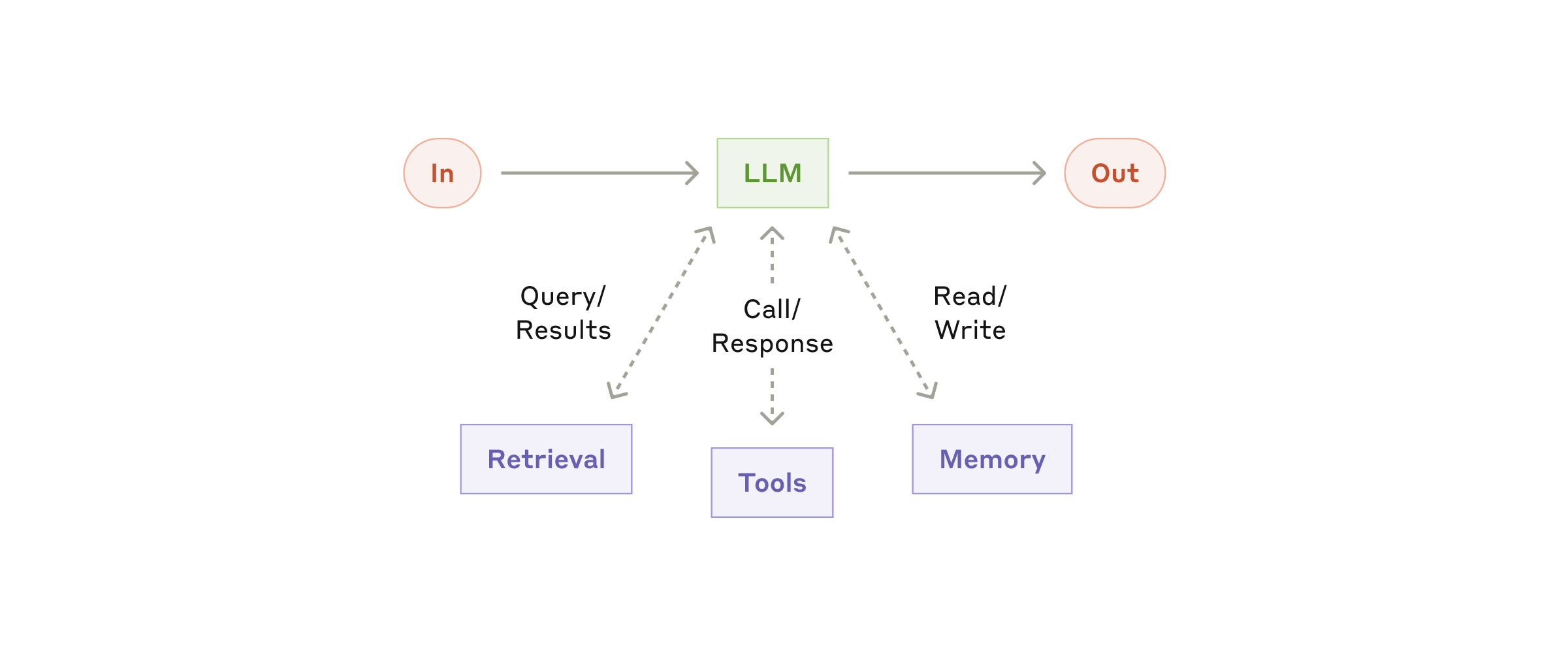
An agent is an LLM plus retrieval, tools, and memory — and the judgement to pick which to use.
Source: Anthropic ↗Foundational framing adapted from Anthropic's "Building effective agents". In TurfAI those
augmentations are concrete: the built-in tool registry and
MCP (tools), the knowledge base (retrieval), and
conversational session memory (memory).
Configuration
These fields map 1:1 to the agent content type. Pass them under data on POST /agents
(see Build an agent with tools).
| Field | Type | Default | Description |
|---|---|---|---|
name | string | — | Display name (required) |
goal | text | — | Objective the agent works toward; supports {{variables}} (required) |
description | text | null | Human-readable summary of what the agent does |
slug | string | auto | Unique URL-safe identifier used in public endpoints |
available_tools | json | [] | Tool IDs the agent may call. Omit the field entirely to grant all built-ins; [] means no tools (pure text agent) |
model | string | vertex | LLM model (vertex, openai, anthropic) |
max_iterations | integer | 10 | Max ReAct cycles before it must answer. Hard-capped at 20 |
temperature | float | 0.3 | LLM temperature |
conversational | boolean | false | Multi-turn mode with session memory + context resolvers |
custom_tools | json | [] | User-defined tools: { name, description, parameters, endpoint } merged into the tool list at runtime |
mcp_servers | json | [] | External MCP servers (inline configs or registry IDs) added as tool sources |
guardrails | json | {} | Output guardrails: { block_patterns: [], require_tool_for: [] } |
context_resolvers | json | ["conversation", "temporal", "channel"] | Which context blocks to inject (conversational mode only) |
business_hours | json | null | Optional schedule used by the temporal context resolver |
welcome_message | text | Hi! How can I help you? | First message shown by an embedded chat widget |
branding | json | { primary_color: "#8b5cf6" } | Widget branding for the public chat surface |
allowed_origins | json | [] | CORS origins allowed to call public chat |
active | boolean | true | Whether the agent can be invoked |
Create one with POST /agents; the response includes the generated api_key (an ag_ key
for public chat — private, returned only on create, regenerate via
POST /agents/:id/regenerate-key).
available_tools is three-state: omit the field → all built-ins; [] →
text-only (no tools); a list → only those tools. Saved-agent fields act as defaults that
inline node config overrides.
The built-in tool registry
Agents draw from a built-in tool set defined in the processor's tool_registry.py. Give each
agent only the tools its job needs:
| Tool ID | Required args | What it does |
|---|---|---|
classify_document | document_id | Classify a document's type and category; returns type, confidence, reasoning |
extract_from_document | document_id or file_url (+mime_type) | Extract structured fields from a document as JSON |
search_documents | query (+ top_k) | Semantic / RAG search over the knowledge base; returns excerpts + citations |
summarize | one of document_id / file_url / text | Summarize content (style: brief, detailed, bullet_points) |
send_email | to, subject, body | Send an email (HTML supported) |
fetch_url | url (+ method) | HTTP GET/POST a URL and return the body |
fetch_drive_file | file_id | Fetch a Google Drive file by ID |
generate_text | prompt (+ context) | Generate text with a prompt — for analysis, writing, formatting |
Extend beyond the built-ins with MCP tools — external MCP servers
(databases, SaaS, custom) are discovered and merged into the agent's tool list at runtime —
or with custom_tools (your own HTTP endpoints).
The execution-time tool list lives in the processor's tool_registry.py; the
IDs above are the same ones surfaced by GET /workflows/task-types under the
agent task's agent_tools. Don't hardcode a list that contradicts the API.
The ReAct loop
Each iteration the agent reasons, optionally calls one tool, observes the result, and repeats
until it produces a plain-text answer or hits max_iterations:
Reading the trace
Every execution records a structured reasoning_trace — your primary debugging tool. Each
entry is one step keyed by type:
{
  "answer": "Employees may work remotely up to 3 days per week.",
  "reasoning_trace": [
    { "step": 1, "type": "act", "tool": "search_documents",
      "args": { "query": "remote work policy", "top_k": 5 } },
    { "step": 1, "type": "observe", "status": "success",
      "result": { "data": { "results": ["…top chunks…"] } } },
    { "step": 2, "type": "answer",
      "content": "Employees may work remotely up to 3 days per week." }
  ],
  "tools_used": ["search_documents"],
  "iteration_count": 2
}
type: "act"— the agent chose a tool;tool+argsshow the call.type: "observe"— the tool result;statusissuccessorerror.type: "think"— intermediate reasoning text (no tool call).type: "answer"— the final response.
The public chat endpoint returns a flattened trace string plus a deduplicated
tools_used array. Read them in this order when debugging: did the agent pick the right
tools (tools_used), did each call succeed (observe.status), and did it stop on an answer
or run out of iterations.
Multi-turn conversations
Set conversational: true and pass a stable session_id on every public-chat call. The
processor loads prior turns from the session, injects the configured context_resolvers, and
persists each new turn — so the agent remembers earlier answers without you re-sending them.
# Turn 1 — creates the session
curl -X POST https://apisandbox.turfai.in/api/agents/support-bot/public-chat \
  -H "X-Agent-Key: $AGENT_KEY" -H "Content-Type: application/json" \
  -d '{ "query": "What is your refund policy?", "session_id": "sess-1" }'

# Turn 2 — same session_id; "it" resolves from memory
curl -X POST https://apisandbox.turfai.in/api/agents/support-bot/public-chat \
  -H "X-Agent-Key: $AGENT_KEY" -H "Content-Type: application/json" \
  -d '{ "query": "Does it cover digital goods?", "session_id": "sess-1" }'
Omit session_id (or leave conversational: false) for stateless, single-shot calls.
Calling an agent
In a workflow — an agent_task node references a saved agent by agent_id; any field
set inline (e.g. goal) overrides the saved default:
{
  "task_type": "agent_task",
  "config": { "agent_id": 42, "goal": "Override goal if needed" }
}
Over public chat — POST /agents/:slug/public-chat with an X-Agent-Key header:
curl -X POST https://apisandbox.turfai.in/api/agents/support-bot/public-chat \
  -H "X-Agent-Key: $AGENT_KEY" \
  -H "Content-Type: application/json" \
  -d '{ "query": "What is your refund policy?", "session_id": "sess-1" }'
{
"answer": "Our refund policy allows returns within 30 days…",
"trace": "Thought: I should search the knowledge base…",
"tools_used": ["search_documents"],
"session_id": "sess-1"
}Reference
Full schema and endpoints: Agent API. To build one hands-on, see Build an agent with tools.