 TurfAI Developers
Knowledge base & RAG
Index documents as embeddings, then query them with cited answers.
The TurfAI knowledge base lets you index documents as vector embeddings and query them in natural language, with answers that cite their sources. This is the RAG pattern: retrieve relevant chunks, then generate an answer grounded in them.
Why grounding matters
A language model answers from training memory unless you give it something better. Grounding means retrieving relevant passages from your documents and having the model answer from those, attaching a citation to each claim — so the answer is verifiable instead of merely plausible.
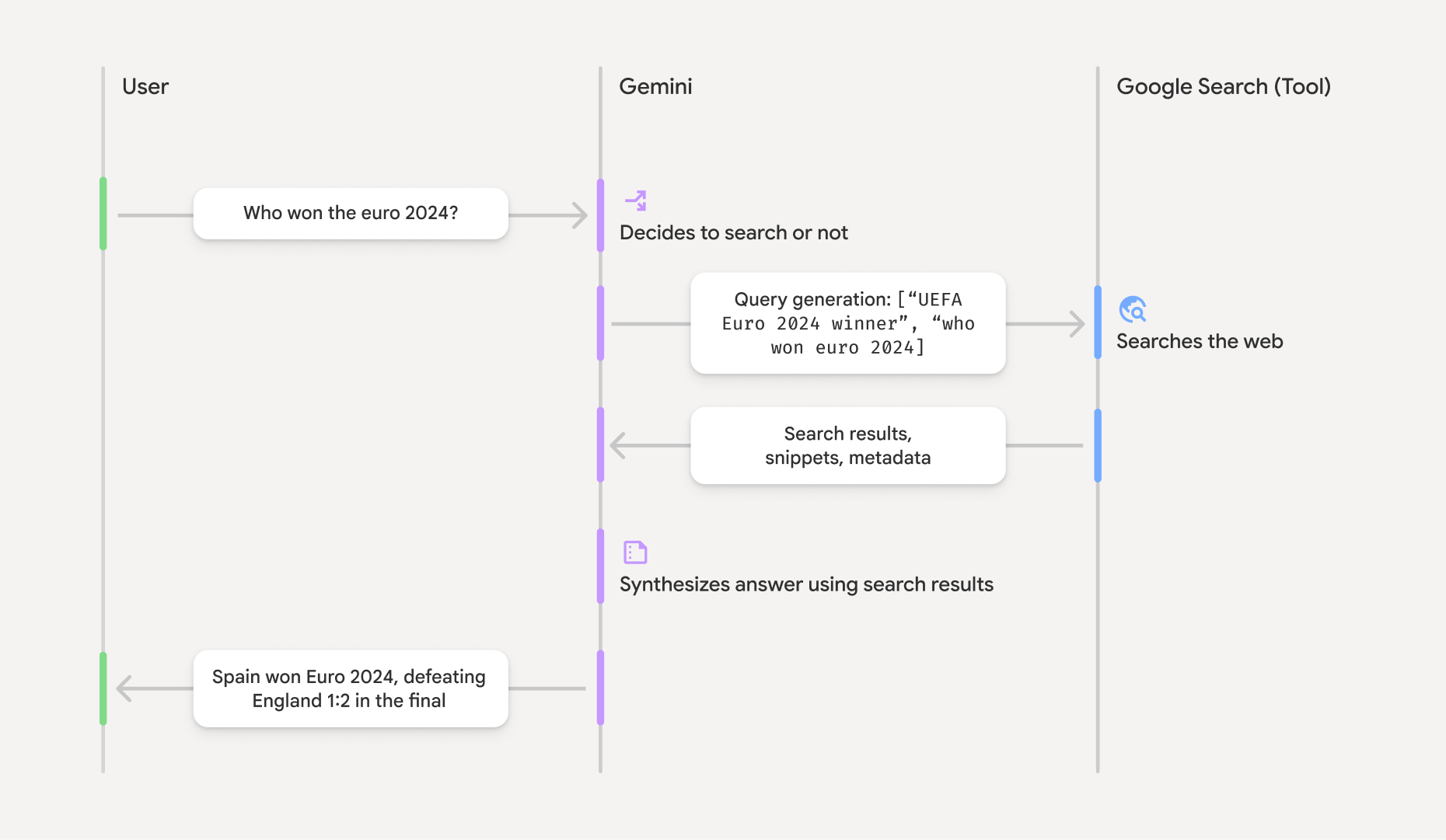
Grounding: retrieve sources, then answer from them with citations back to each source.
Source: Google Gemini API ↗Grounding framing adapted from Google's Gemini API docs; the "smallest citable unit" idea from
Anthropic's Claude docs. In TurfAI each retrieved chunk is that citable unit — the sources[]
a query returns pin every answer back to a document_title, chunk_text, and page_number.
What you'll build
A working "ask your documents" loop: enable RAG on an uploaded document, wait for it to index,
then ask questions and get an answer with cited sources. By the end you'll have run the three
calls that power every RAG feature in TurfAI — including chatbots and the rag_query workflow
task.
Prerequisites
- A JWT in
$TURFAI_JWT— see Authentication. All examples sendAuthorization: Bearer $TURFAI_JWT. - One or more uploaded documents you own. You index by document id (a number), so have
an id ready — e.g.
45below. Uploading is out of scope here; see the Documents API. - Base URL:
https://apisandbox.turfai.in/api.
Indexing is asynchronous. You enable RAG, the document is queued and embedded in the
background, and only once its status is completed will queries return its chunks. The flow
below is enable → poll → query.
The indexing flow
rag_processing_status moves through not_started → queued → processing → completed, or
failed if embedding errors out. Don't query until it's completed.
1. Enable RAG on a document
POST /documents/:id/enable-rag queues the document for embedding and returns immediately. Pass
force_reprocess: true to re-index a document that's already completed.
BASE="https://apisandbox.turfai.in/api"
DOC_ID=45

curl -X POST "$BASE/documents/$DOC_ID/enable-rag" \
  -H "Authorization: Bearer $TURFAI_JWT" \
  -H "Content-Type: application/json" \
  -d '{ "force_reprocess": false }'
import os, requests
BASE = "https://apisandbox.turfai.in/api"
HEAD = {"Authorization": f"Bearer {os.environ['TURFAI_JWT']}", "Content-Type": "application/json"}
DOC_ID = 45
r = requests.post(f"{BASE}/documents/{DOC_ID}/enable-rag", headers=HEAD,
json={"force_reprocess": False})
r.raise_for_status()
print(r.json()) # {"status": "queued", "job_id": "...", "document_id": "45", ...}const BASE = "https://apisandbox.turfai.in/api";
const HEAD = {
Authorization: `Bearer ${process.env.TURFAI_JWT}`,
"Content-Type": "application/json",
};
const DOC_ID = 45;
const res = await fetch(`${BASE}/documents/${DOC_ID}/enable-rag`, {
method: "POST",
headers: HEAD,
body: JSON.stringify({ force_reprocess: false }),
});
console.log(await res.json()); // { status: "queued", job_id: "...", document_id: "45" }{
"status": "queued",
"job_id": "rag-embed-45-1718800000000",
"document_id": "45",
"message": "Document queued for RAG processing"
}Calling enable-rag on a document that's already processing (or already completed without
force_reprocess) returns a 400. That's expected — treat it as "already indexing / indexed".
2. Poll the RAG status
GET /documents/:id/rag-status returns the live processing_status. Poll it until it's
completed, then query. On failed, read the error field.
# Poll once; re-run until processing_status == "completed"
curl -s "$BASE/documents/$DOC_ID/rag-status" \
  -H "Authorization: Bearer $TURFAI_JWT"
import time
while True:
s = requests.get(f"{BASE}/documents/{DOC_ID}/rag-status", headers=HEAD).json()
status = s["processing_status"]
print(status, s.get("chunk_count"))
if status == "completed":
break
if status == "failed":
raise RuntimeError(s.get("error") or "RAG indexing failed")
time.sleep(3)async function waitForRag(docId: number) {
while (true) {
const s = await (
await fetch(`${BASE}/documents/${docId}/rag-status`, { headers: HEAD })
).json();
if (s.processing_status === "completed") return s;
if (s.processing_status === "failed") throw new Error(s.error ?? "RAG indexing failed");
await new Promise((r) => setTimeout(r, 3000));
}
}
await waitForRag(DOC_ID);{
"document_id": "45",
"rag_enabled": true,
"processing_status": "completed",
"chunk_count": 128,
"processed_at": "2026-06-19T10:21:44.000Z",
"error": null,
"embedding_model": "text-embedding-004"
}processing_status is one of not_started, queued, processing, completed, failed.
Indexing inside a workflow
Enabling RAG mid-workflow uses the rag_enable task. Because indexing is async, follow it with
a wait task that polls the rag-status endpoint until it's
completed before any rag_query step runs:
{
  "type": "wait",
  "config": {
    "endpoint": "/api/internal/documents/{{document_id}}/rag-status",
    "method": "GET",
    "watch_field": "processing_status",
    "success_value": "completed",
    "failure_values": ["failed"]
  }
}
3. Query the knowledge base
POST /rag/query retrieves the most relevant chunks across the documents you own and generates a
cited answer.
curl -X POST "$BASE/rag/query" \
  -H "Authorization: Bearer $TURFAI_JWT" \
  -H "Content-Type: application/json" \
  -d '{
    "query": "What is the remote work policy?",
    "top_k": 5,
    "use_reranking": true,
    "similarity_threshold": 0.3
  }'
r = requests.post(f"{BASE}/rag/query", headers=HEAD, json={
"query": "What is the remote work policy?",
"top_k": 5,
"use_reranking": True,
"similarity_threshold": 0.3,
})
data = r.json()
print(data["answer"])
for s in data["sources"]:
print(s["document_title"], round(s["similarity_score"], 2), s.get("signed_url"))const res = await fetch(`${BASE}/rag/query`, {
method: "POST",
headers: HEAD,
body: JSON.stringify({
query: "What is the remote work policy?",
top_k: 5,
use_reranking: true,
similarity_threshold: 0.3,
}),
});
const data = await res.json();
console.log(data.answer);
data.sources.forEach((s: any) => console.log(s.document_title, s.similarity_score));Response
{
  "answer": "Employees may work remotely up to 3 days per week, subject to manager approval…",
  "sources": [
    {
      "document_id": 45,
      "document_title": "Remote Work Policy.pdf",
      "chunk_text": "…employees may work from home up to three days per week with manager approval…",
      "chunk_index": 12,
      "similarity_score": 0.92,
      "page_number": 3,
      "file_url": "gs://turfai-docs/policy.pdf",
      "signed_url": "https://storage.googleapis.com/turfai-docs/policy.pdf?X-Goog-Signature=…",
      "metadata": {}
    }
  ],
  "confidence": 0.88,
  "processing_time_ms": 742,
  "query": "What is the remote work policy?",
  "session_id": "sess-abc123",
  "timestamp": "2026-06-19T10:25:01.000Z"
}
Each entry in sources carries the document_id and document_title it came from, the matched
chunk_text (with chunk_index / page_number), and a similarity_score (0–1). file_url is
the raw gs:// path; the API also returns a short-lived signed_url (valid ~1 hour) you can
link users straight to.
Request knobs
| Field | Default | What it does |
|---|---|---|
top_k | 5 | Number of chunks to retrieve (1–20). Raise for broad questions, lower for precision. |
similarity_threshold | 0.3 | Drop chunks below this cosine score. Raise to cut noise, lower to recover misses (e.g. multi-lingual docs). |
use_reranking | false | Re-rank retrieved chunks with a cross-encoder before generating — better ordering at a small latency cost. |
filters | — | Scope the search: { "document_ids": [45, 46] }, collection_ids, or tenant_id. |
session_id | — | Multi-turn context (see below). Omit to start fresh. |
Multi-turn sessions
For conversational Q&A, pass a session_id so prior turns inform the next answer. The first
query auto-creates a session (returned as session_id); reuse it on follow-ups. You can also
pre-create one with POST /rag/sessions, and list / rename / delete sessions under
/rag/sessions.
# Turn 1 — note the session_id in the response
curl -s -X POST "$BASE/rag/query" \
  -H "Authorization: Bearer $TURFAI_JWT" -H "Content-Type: application/json" \
  -d '{ "query": "How many remote days are allowed?" }'

# Turn 2 — pass that session_id so "and for managers?" resolves in context
curl -s -X POST "$BASE/rag/query" \
  -H "Authorization: Bearer $TURFAI_JWT" -H "Content-Type: application/json" \
  -d '{ "query": "And for managers?", "session_id": "sess-abc123" }'
first = requests.post(f"{BASE}/rag/query", headers=HEAD,
json={"query": "How many remote days are allowed?"}).json()
sid = first["session_id"]
followup = requests.post(f"{BASE}/rag/query", headers=HEAD,
json={"query": "And for managers?", "session_id": sid}).json()
print(followup["answer"])const first = await (await fetch(`${BASE}/rag/query`, {
method: "POST", headers: HEAD,
body: JSON.stringify({ query: "How many remote days are allowed?" }),
})).json();
const followup = await (await fetch(`${BASE}/rag/query`, {
method: "POST", headers: HEAD,
body: JSON.stringify({ query: "And for managers?", session_id: first.session_id }),
})).json();
console.log(followup.answer);In workflows and chatbots
rag_querytask — query the knowledge base mid-workflow (e.g. employee Q&A that emails the answer).- Chatbots — a chatbot is a deployable RAG front end with an embeddable widget and source citations; see Build a chatbot.
The RAG chat path is not tokenised by Data Shield in v0.5 — RAG chat and chatbot public chat are explicitly out of Data Shield's coverage. Don't index documents whose PII must never reach the LLM until that path is covered.
Troubleshooting
No results, or the answer says it can't find anything. Your similarity_threshold may be too
high — lower it (e.g. 0.2) to recover near-misses, especially for multi-lingual documents. Also
confirm the document's processing_status is completed and chunk_count > 0.
Irrelevant or poorly-ordered sources. Set use_reranking: true to re-order chunks with a
cross-encoder, and raise similarity_threshold to cut weak matches. Narrow the search with
filters.document_ids when you know which documents should answer the question.
Document stuck in processing. Embedding runs in the background; large PDFs take longer. Keep
polling rag-status. If it doesn't advance, re-run enable-rag with force_reprocess: true.
Status failed. Read the error field from rag-status for the cause. Fix the input (or
backend config) and re-enable with force_reprocess: true.
Scanned PDFs / images. PDFs are processed with the default Google File Search backend's native vision, which extracts text from scanned pages — but OCR behaviour for scanned PDFs isn't formally guaranteed, so verify with a real sample. Standalone image files (JPEG/PNG) aren't a supported file type; convert them to PDF before indexing. See Google File Search file handling for the supported-type matrix.
Reference
- Full endpoints — enable-rag, disable-rag, rag-status,
/rag/query, and sessions: RAG API. - The dedicated RAG Query Service API (the
/rag/querycall proxies to it). - Backend setup (Google File Search vs pgvector) is operator-side and lives in the platform docs.