 TurfAI Developers
Integrations
Act on the world — email, Google Drive, Gmail, REST APIs, OAuth, MCP, and credentials.
Reasoning is only useful if a workflow can act. TurfAI integrates with the outside world through integration task types, OAuth (Google-delegated and a generic OAuth2 adapter), the MCP protocol, and a secure credential store.
How tools work: the call loop
Whether a tool is a built-in, your own HTTP endpoint, or an MCP server, the shape is the same. The model never runs your code — it emits a structured call (a tool name plus JSON arguments), your runtime executes it, and the result is handed back so the model can continue. Request → call → execute → return → respond.
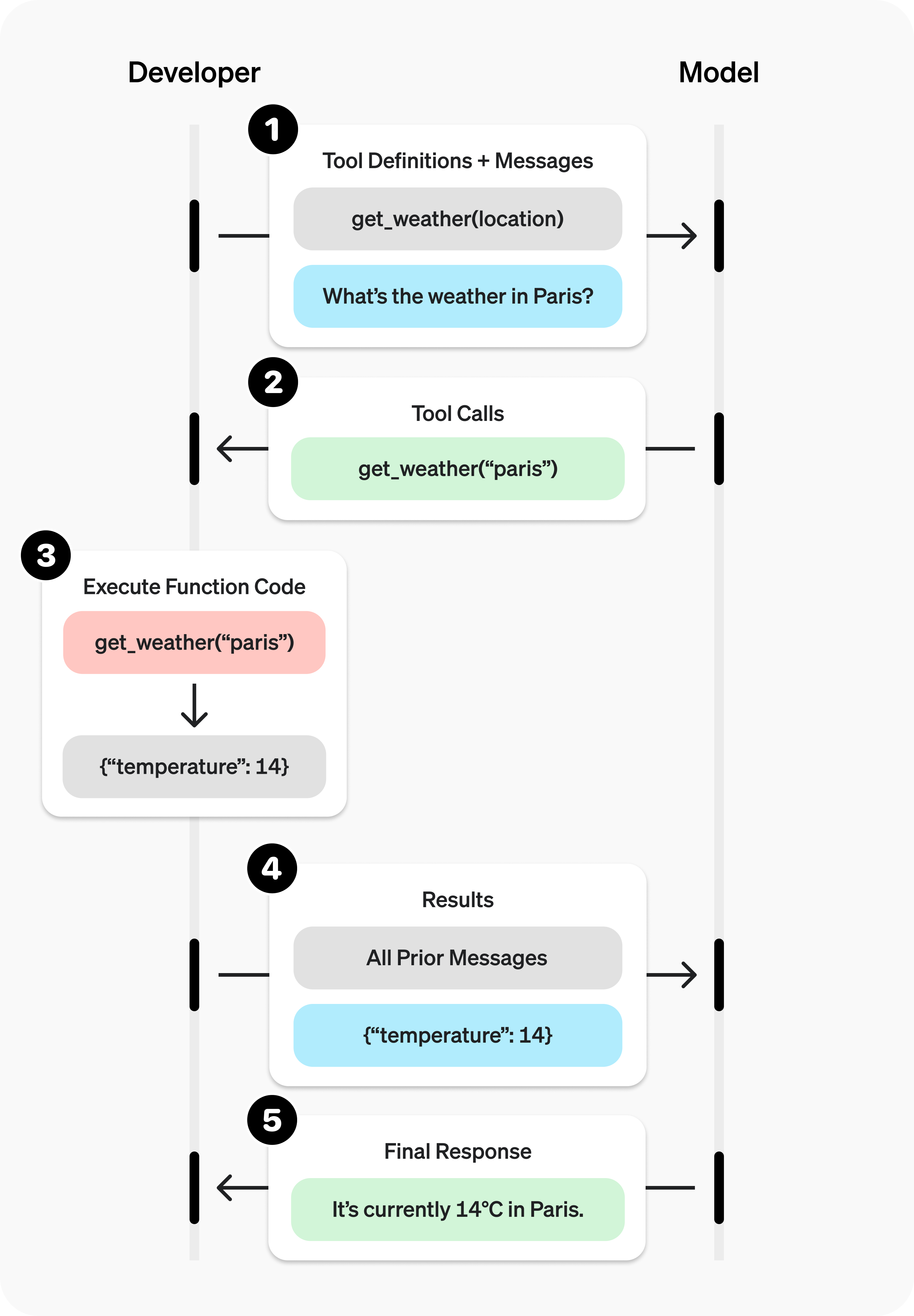
The tool-calling loop. In TurfAI the executor is the runtime that runs the call.
Source: OpenAI ↗Tool-calling loop adapted from OpenAI's function-calling guide. In a workflow the executor plays the "your code" role; for an agent it's the ReAct loop calling tools from its registry.
Built-in integration tasks
Each task type is a node you drop into a workflow. The executor resolves {{variable}}
templates in config from the trigger payload, upstream node outputs, and injected
credentials/OAuth tokens before the processor runs.
| Task type | Purpose | Key config |
|---|---|---|
email_send_task | Send templated email to to / cc / bcc | to[], subject, body, html (default true), optional from |
google_drive_fetch_task | Fetch a Drive file by ID, or search a folder by name | file_id, or folder_id + file_name |
gmail_task | Fetch/filter Gmail messages (subject, label, query, date, attachments) | query, subject, label, max_results (default 10), download_attachments |
rest_api_task | Call any HTTP API with templated URL/headers/body and JSONPath output mapping | url, method, headers, body, timeout (default 60), output_mapping |
The rest_api_task is the universal escape hatch — if a system has an HTTP API, a workflow
can call it. See the REST integration guide. Field-level
schemas live in the Task types reference.
email_send_task sends through the platform mailer. gmail_task reads a connected Gmail
account and requires the Google OAuth connection below. SMTP from/credentials are configured
on the server, not in the node.
Google (Drive & Gmail)
Google integrations use delegated OAuth (distinct from "Sign in with Google" login). A user grants TurfAI access to their own Drive/Gmail; the platform stores per-user tokens and auto-refreshes them when a workflow runs.
| Step | Endpoint |
|---|---|
| Start consent | GET /google/oauth/authorize |
| Provider redirect | GET /google/oauth/callback (no auth — provider hits it) |
| Check connection | GET /google/oauth/status |
| Revoke | POST /google/oauth/revoke |
Scopes are limited to what the feature needs (Drive read, Gmail read/reply). Once
GET /google/oauth/status shows connected, workflows can fetch Drive files, read Gmail, and
the Event Bus can watch folders. Full detail:
Google OAuth reference.
Generic OAuth2 adapter (any provider)
Beyond Google, TurfAI ships a provider-agnostic OAuth2 adapter. A new provider is added by
registering an integration record with an oauth_config (authorize/token/userinfo/revoke
URLs, scopes, env-var names for client id/secret, optional PKCE) — no code changes. The
same four endpoints serve every provider:
| Step | Endpoint |
|---|---|
| Start consent | GET /oauth/{provider}/authorize |
| Provider redirect | GET /oauth/{provider}/callback |
| Check connection | GET /oauth/{provider}/status |
| Revoke | POST /oauth/{provider}/revoke |
Microsoft 365, Salesforce, and Slack are seeded out of the box. To use a connected provider's
token in a workflow node, set "oauth_integration": "{provider}" in the node config — at
execution time the executor looks up the user's tokens, auto-refreshes if expiring, and injects
oauth_access_token into the node's input_mapping (the oauth_integration key is then
removed before the processor sees it).
{
  "task_type": "rest_api_task",
  "config": {
    "oauth_integration": "microsoft_365",
    "url": "https://graph.microsoft.com/v1.0/me/messages",
    "method": "GET",
    "headers": { "Authorization": "Bearer {{oauth_access_token}}" }
  }
}
Credentials
Don't hardcode secrets in task configs. Store them as credentials (/api/credentials):
each has a name, a provider, named fields, and is encrypted at rest with AES-256-GCM.
The API never returns secret values — only metadata and field_names.
curl -X POST https://apisandbox.turfai.in/api/credentials \
  -H "Authorization: Bearer $TURFAI_JWT" \
  -H "Content-Type: application/json" \
  -d '{
    "data": {
      "name": "Acme API",
      "provider": "acme",
      "fields": { "api_token": "sk_live_…" }
    }
  }'
The response echoes metadata only — id, name, provider, field_names: ["api_token"] —
never the values.
How {{variable}} resolves
A node references a credential by its numeric credential_id, not by name. At execution
time the executor decrypts the credential and merges each field into that node's
input_mapping (without overwriting existing keys), then deletes credential_id from the
config so the processor never sees it. Templated strings in url / headers / body then
resolve {{field_name}} from input_mapping:
{
  "task_type": "rest_api_task",
  "config": {
    "credential_id": 7,
    "url": "https://api.acme.com/roles/{{role_id}}",
    "headers": { "Authorization": "Bearer {{api_token}}" }
  }
}
Here {{api_token}} comes from credential 7's decrypted fields, and {{role_id}} comes
from the trigger payload or an upstream node. Deleting a credential requires
step-up authentication. Walk through it end to end in the
REST integration guide.
MCP (Model Context Protocol)
MCP is the open standard for connecting AI to external tools. Think of it as a USB-C port for AI applications: instead of a bespoke integration per tool or data source, you connect once to a standard and reuse it everywhere.
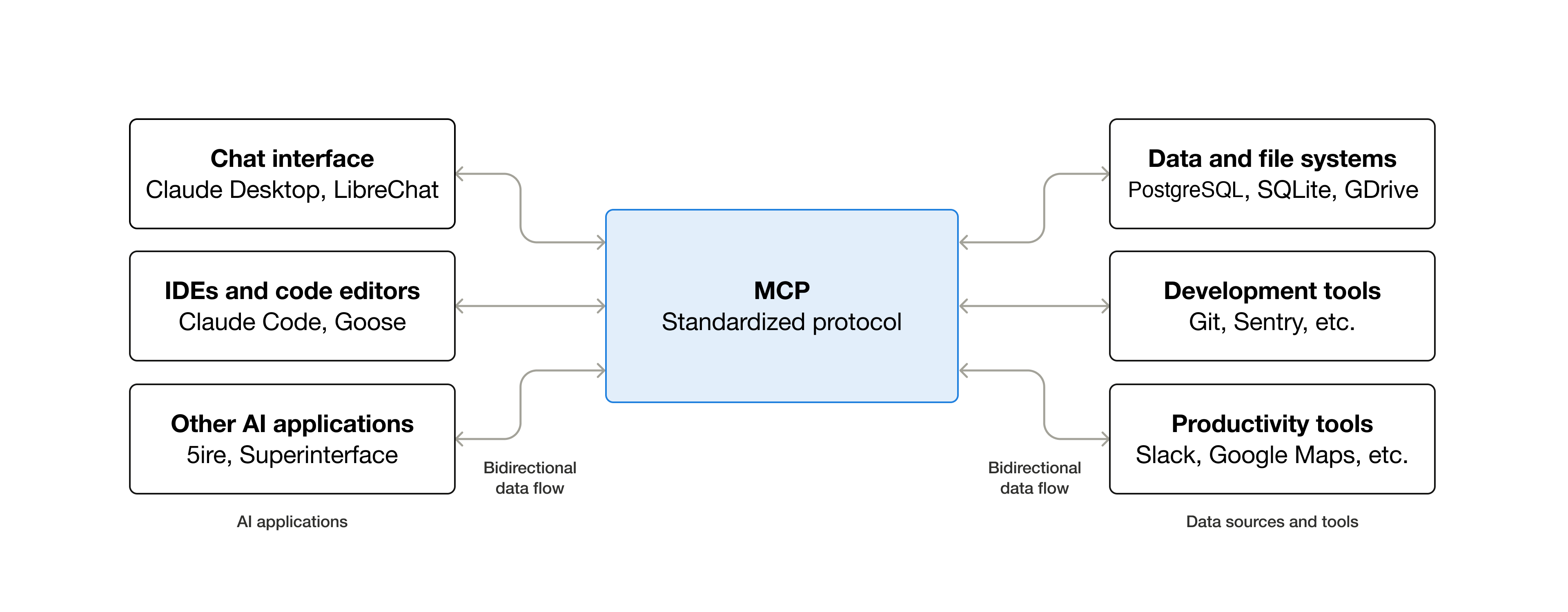
MCP standardizes how an AI app plugs into external tools, data, and workflows.
Source: Model Context Protocol (Anthropic) ↗"USB-C for AI" framing adapted from modelcontextprotocol.io. TurfAI uses MCP two ways:
- Outbound — TurfAI exposes its own capabilities (extract, search, workflow, agent chat) as an MCP server so clients like Claude Desktop or Cursor can call them.
- Inbound — agents connect to external MCP servers (databases, GitHub, Slack, custom)
and use their tools inside the ReAct loop. Configure an agent's
mcp_servers, and the discovered tools merge into its tool list automatically (namespacedserverId::toolName). A workflow can also call a single MCP tool as a step via themcp_tool_tasknode.
Inbound MCP (agent mcp_servers and the mcp_tool_task node) work over
the stdio transport today — the agent launches the MCP server as a local
subprocess. SSE / Streamable-HTTP transports are on the roadmap. Verify the
transport you need before depending on it.
See Use MCP tools.