 TurfAI Developers
Workflows & activities
The DAG model, triggers, variables, and the execution lifecycle — with runnable curl / Python / Node examples.
A workflow is a directed acyclic graph (DAG) of nodes. The saved, reusable definition is
an activity (/api/activities); each run of it is a workflow execution
(/api/workflow-executions). The graph is acyclic by design — decision nodes create
branches, never loops.
Where workflows sit
Industry guidance draws a line between workflows — systems where the LLM and tools follow predefined paths — and agents, where the model directs its own path. TurfAI's canvas is the workflow side of that line: you wire the graph, so every run is predictable and auditable. Reach for an agent only when the steps can't be fixed up front.
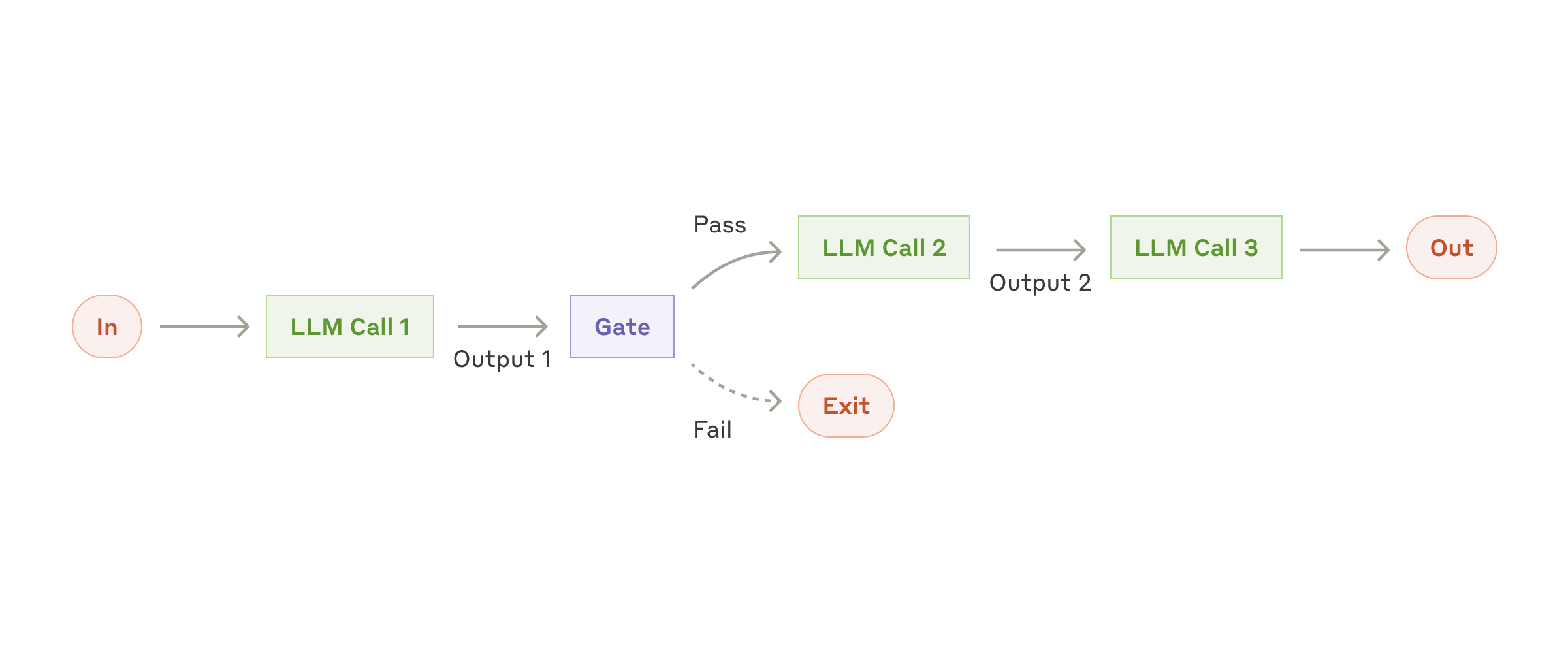
The simplest workflow: chain steps and gate between them — exactly a node DAG.
Source: Anthropic ↗Workflow-vs-agent distinction adapted from Anthropic's "Building effective agents".
What you'll build
By the end of this page you'll be able to define a workflow as an activity, trigger an execution, poll it to a terminal state, and read the per-node outputs — driving the whole thing over HTTP in curl, Python, or Node.
Prerequisites
- A JWT for the authenticated
/activitiesand/workflow-executionscalls — see Authentication. (Webhook triggers use a per-webhook secret instead — see Quickstart.) - The base URL. Staging is
https://apisandbox.turfai.in/api; local ishttp://localhost:1338/api. Examples below use staging. - A saved activity id to run — create one in the worked example below, or use one you built in the UI.
Export these once and the snippets below run as-is:
export TURFAI_JWT=… and export BASE=https://apisandbox.turfai.in/api.
The workflow definition
A workflow_definition has nodes, edges, and an input_schema. Each node declares a
task_type and a config; edges connect node IDs. Two output_schema and input_schema
fields on the activity describe the run's overall contract.
Frontend vs backend node format. The React Flow builder stores node.type as the
specific task type (e.g. "classification_task"). The executor only runs nodes whose
type === "task", reading the real type from node.data.task_type. When you author a
definition by hand for execution, use the backend format below (type: "task"), and
always include input_schema — omitting it is a 400 ("does not include an input schema").
See data schemas.
{
  "nodes": [
    {
      "id": "classify-1",
      "type": "task",
      "position": { "x": 0, "y": 0 },
      "data": {
        "label": "Classify Document",
        "task_type": "classification_task",
        "config": { "classification_type": "document_type" }
      }
    },
    {
      "id": "extract-1",
      "type": "task",
      "position": { "x": 240, "y": 0 },
      "data": {
        "label": "Extract Data",
        "task_type": "extraction_task",
        "config": { "output_format": "json" }
      }
    }
  ],
  "edges": [
    { "id": "e1", "source": "classify-1", "target": "extract-1" }
  ],
  "input_schema": {
    "type": "object",
    "required": ["file_url"],
    "properties": { "file_url": { "type": "string" } }
  }
}
Validate a definition before saving with POST /workflows/validate — it catches cycles and
edges that reference missing nodes, returning { "valid": true, "errors": [] }.
Define an activity
POST /activities saves a workflow_definition as a reusable activity and returns its id.
GET /activities/:id reads one back. Both need your JWT. (Note the Strapi data envelope on
the request and response.)
# Create
curl -X POST "$BASE/activities" \
  -H "Authorization: Bearer $TURFAI_JWT" \
  -H "Content-Type: application/json" \
  -d '{
    "data": {
      "name": "Invoice triage",
      "workflow_type": "document_processing",
      "status": "draft",
      "workflow_definition": { "nodes": [], "edges": [], "input_schema": { "type": "object", "properties": {}, "required": [] } }
    }
  }'

# Read it back (id from the create response)
curl "$BASE/activities/42" -H "Authorization: Bearer $TURFAI_JWT"
import os, requests
BASE = os.environ["BASE"]
HEAD = {"Authorization": f"Bearer {os.environ['TURFAI_JWT']}"}
def create_activity(definition: dict) -> int:
r = requests.post(f"{BASE}/activities", headers=HEAD, json={
"data": {
"name": "Invoice triage",
"workflow_type": "document_processing",
"status": "draft",
"workflow_definition": definition,
}
})
r.raise_for_status()
return r.json()["data"]["id"]
def get_activity(activity_id: int) -> dict:
r = requests.get(f"{BASE}/activities/{activity_id}", headers=HEAD)
r.raise_for_status()
return r.json()["data"]const BASE = process.env.BASE!;
const HEAD = {
Authorization: `Bearer ${process.env.TURFAI_JWT}`,
"Content-Type": "application/json",
};
export async function createActivity(definition: object): Promise<number> {
const res = await fetch(`${BASE}/activities`, {
method: "POST",
headers: HEAD,
body: JSON.stringify({
data: {
name: "Invoice triage",
workflow_type: "document_processing",
status: "draft",
workflow_definition: definition,
},
}),
});
if (!res.ok) throw new Error(`create failed: ${res.status}`);
return (await res.json()).data.id;
}
export async function getActivity(id: number) {
const res = await fetch(`${BASE}/activities/${id}`, { headers: HEAD });
if (!res.ok) throw new Error(`get failed: ${res.status}`);
return (await res.json()).data;
}Triggers
A workflow starts from one of:
- Webhook — an HTTP
POST(JSON ormultipart/form-datafile upload). Body fields becomeinputs; uploaded files injectinputs.<field>_file_urlandinputs.<field>_document_id. Returns anexecution_id+ a short-livedpolling_token. See Quickstart and the webhook guide. - Event — an external event (e.g. a new file in a watched Drive folder) via the Event Bus — see event-driven.
- Schedule — a cron run.
- Manual / direct — create the execution, then start it:
POST /workflow-executions(with{ "data": { "activity": 42, "inputs": {…} } }) →POST /workflow-executions/:id/execute.
Trigger an execution
The most direct path against a saved activity. execute queues the run and returns
status: "queued".
# 1. Create an execution bound to activity 42
EXEC=$(curl -s -X POST "$BASE/workflow-executions" \
  -H "Authorization: Bearer $TURFAI_JWT" \
  -H "Content-Type: application/json" \
  -d '{ "data": { "activity": 42, "inputs": { "file_url": "gs://bucket/invoice.pdf" } } }' \
  | python3 -c 'import sys,json;print(json.load(sys.stdin)["data"]["id"])')

# 2. Start it
curl -X POST "$BASE/workflow-executions/$EXEC/execute" \
  -H "Authorization: Bearer $TURFAI_JWT" \
  -H "Content-Type: application/json" \
  -d '{ "inputs": { "file_url": "gs://bucket/invoice.pdf" } }'
def trigger(activity_id: int, inputs: dict) -> int:
created = requests.post(f"{BASE}/workflow-executions", headers=HEAD, json={
"data": {"activity": activity_id, "inputs": inputs}
})
created.raise_for_status()
exec_id = created.json()["data"]["id"]
started = requests.post(
f"{BASE}/workflow-executions/{exec_id}/execute",
headers=HEAD, json={"inputs": inputs},
)
started.raise_for_status()
return exec_idexport async function trigger(activityId: number, inputs: object): Promise<number> {
const created = await fetch(`${BASE}/workflow-executions`, {
method: "POST", headers: HEAD,
body: JSON.stringify({ data: { activity: activityId, inputs } }),
});
if (!created.ok) throw new Error(`create exec failed: ${created.status}`);
const execId = (await created.json()).data.id;
const started = await fetch(`${BASE}/workflow-executions/${execId}/execute`, {
method: "POST", headers: HEAD, body: JSON.stringify({ inputs }),
});
if (!started.ok) throw new Error(`execute failed: ${started.status}`);
return execId;
}Variables and data flow
Reference any earlier value with {{variable}} templates; pull nested fields with JSONPath.
At render time, {{var}} is replaced from the merged inputs/outputs; an unresolved
reference is left intact as the literal {{var}} text (rather than blanked) — a useful tell
when debugging. Variables come from three sources:
- Trigger payload — what the webhook/event delivered, available as
inputs.*. - Upstream node outputs — e.g.
{{classify-1.document_type}}from a classify node. - Workflow context —
user_id,execution_id.
Webhook { "file_url": "gs://bucket/invoice.pdf" }
  → classify-1 uses {{file_url}}          → outputs { "document_type": "invoice", "confidence": 0.96 }
  → route-1 branches on {{classify-1.document_type}}
  → extract-1 uses {{file_url}}           → outputs { "vendor": "Acme", "total": 1240.00 }
  → email-1 uses {{extract-1.vendor}}, {{extract-1.total}}
A complete worked example
A 3-node classify → decision → extract DAG. The decision node routes on the classifier's
output via labelled edges; only the matching branch runs. This is in backend node format and
is ready to pass as workflow_definition to POST /activities.
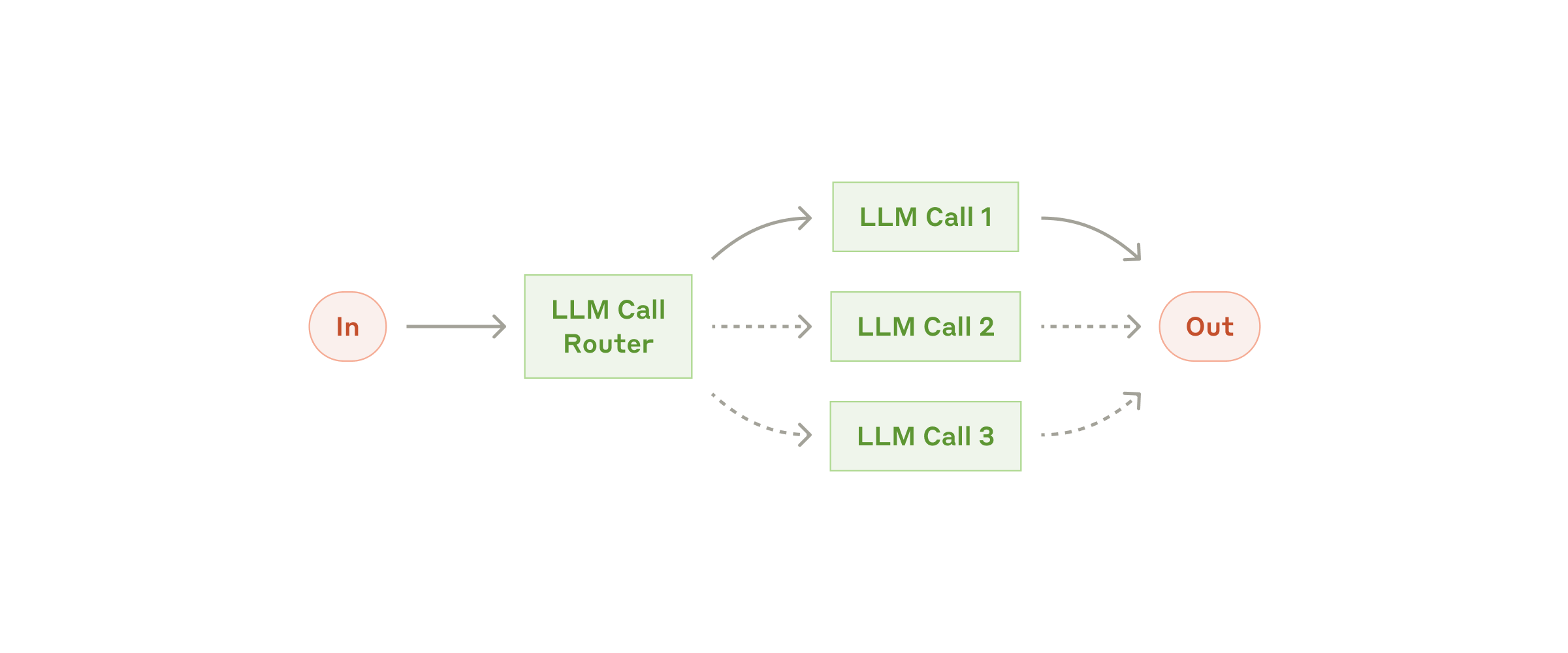
Routing: a classifier sends each input down a specialized branch — that's the decision node.
Source: Anthropic ↗{
"nodes": [
{
"id": "classify-1",
"type": "task",
"position": { "x": 0, "y": 0 },
"data": {
"label": "Classify Document",
"task_type": "classification_task",
"config": {
"classification_type": "document_type",
"file_url": "{{file_url}}"
}
}
},
{
"id": "route-1",
"type": "task",
"position": { "x": 240, "y": 0 },
"data": {
"label": "Route by type",
"task_type": "decision_task",
"config": { "expression": "{{classify-1.document_type}}" }
}
},
{
"id": "extract-1",
"type": "task",
"position": { "x": 480, "y": -80 },
"data": {
"label": "Extract invoice fields",
"task_type": "extraction_task",
"config": {
"output_format": "json",
"file_url": "{{file_url}}",
"fields": ["vendor", "invoice_number", "total"]
}
}
},
{
"id": "notify-1",
"type": "task",
"position": { "x": 480, "y": 80 },
"data": {
"label": "Flag non-invoice",
"task_type": "email_send_task",
"config": {
"to": ["ops@example.com"],
"subject": "Unrecognised document: {{classify-1.document_type}}",
"body": "A document classified as {{classify-1.document_type}} skipped extraction."
}
}
}
],
"edges": [
{ "id": "e1", "source": "classify-1", "target": "route-1" },
{ "id": "e2", "source": "route-1", "target": "extract-1", "label": "invoice" },
{ "id": "e3", "source": "route-1", "target": "notify-1", "label": "other" }
],
"input_schema": {
"type": "object",
"required": ["file_url"],
"properties": {
"file_url": { "type": "string", "description": "gs:// or https URL of the source document" }
}
}
}Notes that trip people up:
- Every executable node is
type: "task"; the real type lives indata.task_type. - Email recipients (
to) must be an array, even for one address — a string is counted character-by-character. See the common pitfalls. - Decision edges carry a
label; the executor follows the edge whose label matches the decision node's output.
Execution lifecycle
Execution is asynchronous. You start a run and poll a status endpoint until a terminal state. Internally the run also flows through the queue → router → processor pipeline described in the communication standard, but as a caller you only see the statuses below.
| Status | Meaning |
|---|---|
queued | Accepted, waiting for a worker |
running | Executing nodes |
awaiting_user_input | Paused at a human step (see HITL); carries awaiting_input_schema + correlation_token, resume with POST /workflow-executions/:id/resume |
completed | Finished; read results |
failed | Check error (and the failing node in task_states) |
Poll for status
GET /workflow-executions/:id/status returns the live status and per-node task_states;
GET /workflow-executions/:id returns the full record including results. Poll every 2–5s
and stop on a terminal status.
curl "$BASE/workflow-executions/93/status" \
  -H "Authorization: Bearer $TURFAI_JWT"
import time
def poll(exec_id: int, attempts: int = 30) -> dict:
for _ in range(attempts):
r = requests.get(f"{BASE}/workflow-executions/{exec_id}/status", headers=HEAD)
r.raise_for_status()
data = r.json()["data"]
if data["status"] == "completed":
return data["results"]
if data["status"] == "failed":
raise RuntimeError(data.get("error"))
time.sleep(2)
raise TimeoutError("polling timed out")const sleep = (ms: number) => new Promise((r) => setTimeout(r, ms));
export async function poll(execId: number, attempts = 30) {
for (let i = 0; i < attempts; i++) {
const res = await fetch(`${BASE}/workflow-executions/${execId}/status`, { headers: HEAD });
if (!res.ok) throw new Error(`status failed: ${res.status}`);
const { data } = await res.json();
if (data.status === "completed") return data.results;
if (data.status === "failed") throw new Error(data.error);
await sleep(2000);
}
throw new Error("polling timed out");
}A completed status response (results/outputs are keyed by node id):
{
  "data": {
    "id": 93,
    "status": "completed",
    "outputs": {
      "classify-1": { "document_type": "invoice", "confidence": 0.96 },
      "extract-1": {
        "extraction_result": { "vendor": "Acme", "invoice_number": "INV-2031", "total": 1240.00 },
        "metadata": { "output_format": "json", "batch_status": "completed" }
      }
    },
    "task_states": {
      "classify-1": { "status": "completed" },
      "route-1": { "status": "completed" },
      "extract-1": { "status": "completed" }
    },
    "error": null,
    "started_at": "2025-11-19T11:28:42.000Z",
    "completed_at": "2025-11-19T11:28:44.995Z"
  }
}
Troubleshooting
| Symptom | Likely cause & fix |
|---|---|
A {{var}} shows up literally in output / a field is empty | The reference didn't resolve — the key isn't in inputs or the upstream node's output. Check the exact key ({{node-id.field}}) against outputs from a prior run. |
| "Executing workflow with 0 steps" / nothing runs | Nodes have a specific type (e.g. "email_send_task"). The executor only runs type: "task" — move the specific type into data.task_type. |
POST /activities returns 400 "does not include an input schema" | The definition is missing input_schema. Always include { "type": "object", "properties": {}, "required": [] }. |
| Validation rejects the graph | A cycle or an edge pointing at a missing node id. Run POST /workflows/validate and read errors. |
Execution stuck in awaiting_user_input | It's at a human step. Submit the response and resume with POST /workflow-executions/:id/resume using the correlation_token — see the HITL guide. |
| 401 mid-poll on a webhook-triggered run | The polling_token is a ~1h JWT scoped to one execution. Switch to your JWT or re-trigger. |
failed with WORKFLOW_DEADLINE_EXCEEDED | The run exceeded execution_deadline_seconds (default 1800s, clamped 60–14400). Raise it on the activity or split the workflow. |
| Transient node failure that never recovers | Retries are exhausted (max_retries, resolved per-node → per-workflow → tenant → default 3). Inspect the failing node in task_states and the error. |
Ownership and levels
Activities have a level: system (platform-provided), user (yours, the default), or
internal (hidden transient workflows). To customize a system workflow, clone it into a
user-owned copy with POST /activities/:id/instantiate — your edits won't be overwritten when
the original updates. The response returns the new workflow_id. This is the same "fork"
mechanism solution packs use.
Activities also carry execution controls surfaced in the table above:
execution_deadline_seconds, max_retries, and a data_shield_policy
(see Data Shield).
Next steps & reference
- Quickstart — the webhook path end to end.
- Task types — what each node can do and its
configschema. - HITL guide — pausing and resuming on human input.
- Event-driven — triggering from external events.
- Full endpoint and field details: Workflow integration guide and the Workflow Execution API. Don't hand-copy these — they're the synced source of truth.